How Does Motor Optimization Work in MotorDesignSoftware?
Motor design is usually a balancing act. We may want to increase torque, reduce torque ripple, improve back EMF, reduce magnet weight — or satisfy several of these at once. The challenge is finding the right combination of design parameters without spending forever running an electromagnetic simulation for every possible design.
This is where optimization helps. In MotorDesignSoftware, the optimization feature combines finite element analysis (FEA), reduced-order models (ROMs), and optimization algorithms to search for promising motor designs while keeping the number of FEA simulations manageable. In this article I walk through how the process works and the settings that will be available to users when the feature goes live.
1. Start with a parameterized motor
The first step is to make a parameterized .mds file. This defines the motor parameters that can be varied during optimization — depending on the motor, these could include magnet dimensions, slot geometry, rotor dimensions, or other design variables. To make a parameterized file, you simply add variables instead of numbers while building the geometry, winding or simulation setup.
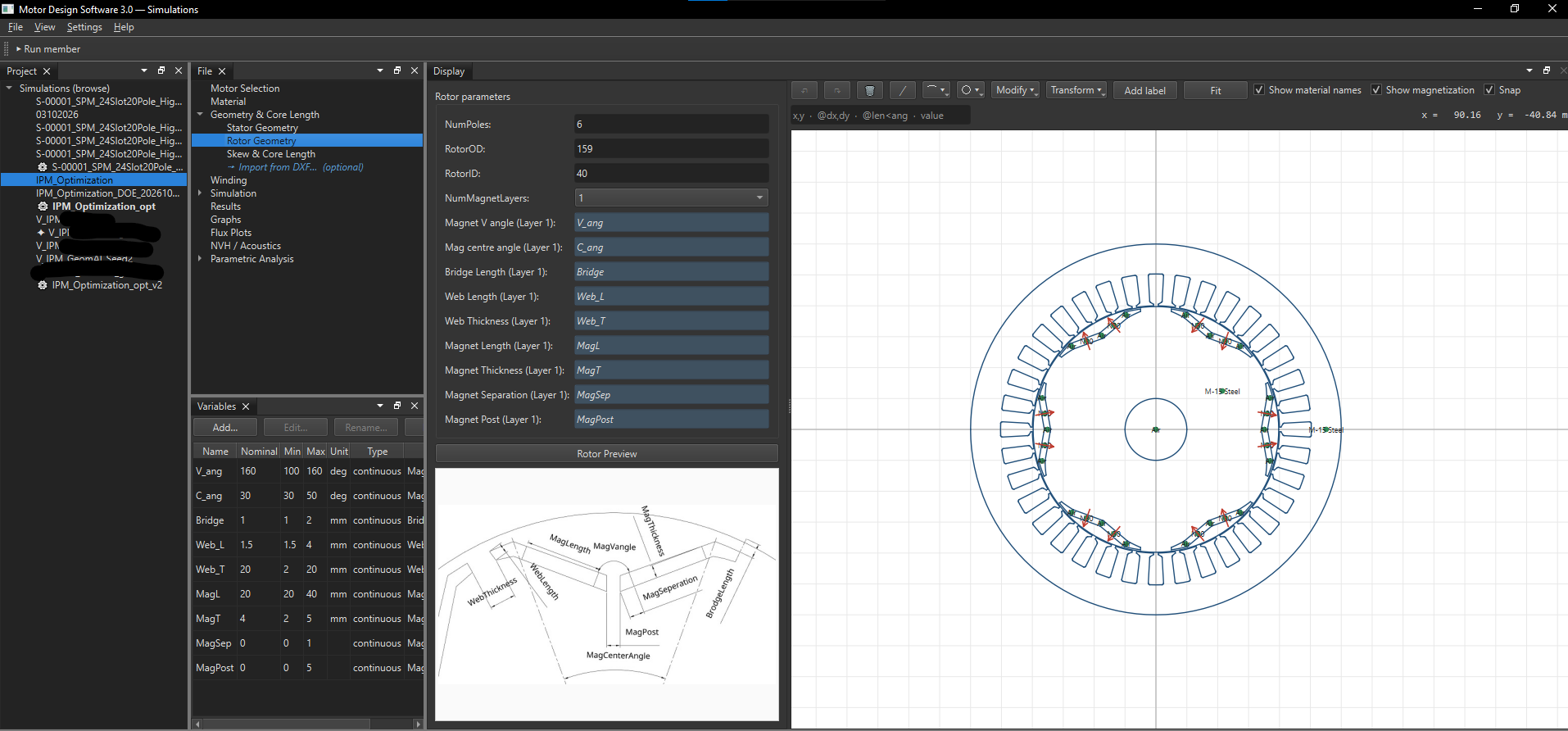
.mds model.The optimizer uses these parameters to generate candidate designs. Before running a simulation, the software also checks the geometry and other conditions required for a valid model — important, because not every combination of parameters produces a physically valid geometry or a simulation that completes successfully. To start, you open a new optimization study and select a parameterized .mds file.
2. Define the objectives and constraints
Once the motor is selected, the next step is to define what you want to achieve. For example, you might want to:
- maximize back EMF
- increase average torque
- minimize torque ripple
- reduce total harmonic distortion (THD)
- minimize magnet weight
- optimize several of these simultaneously
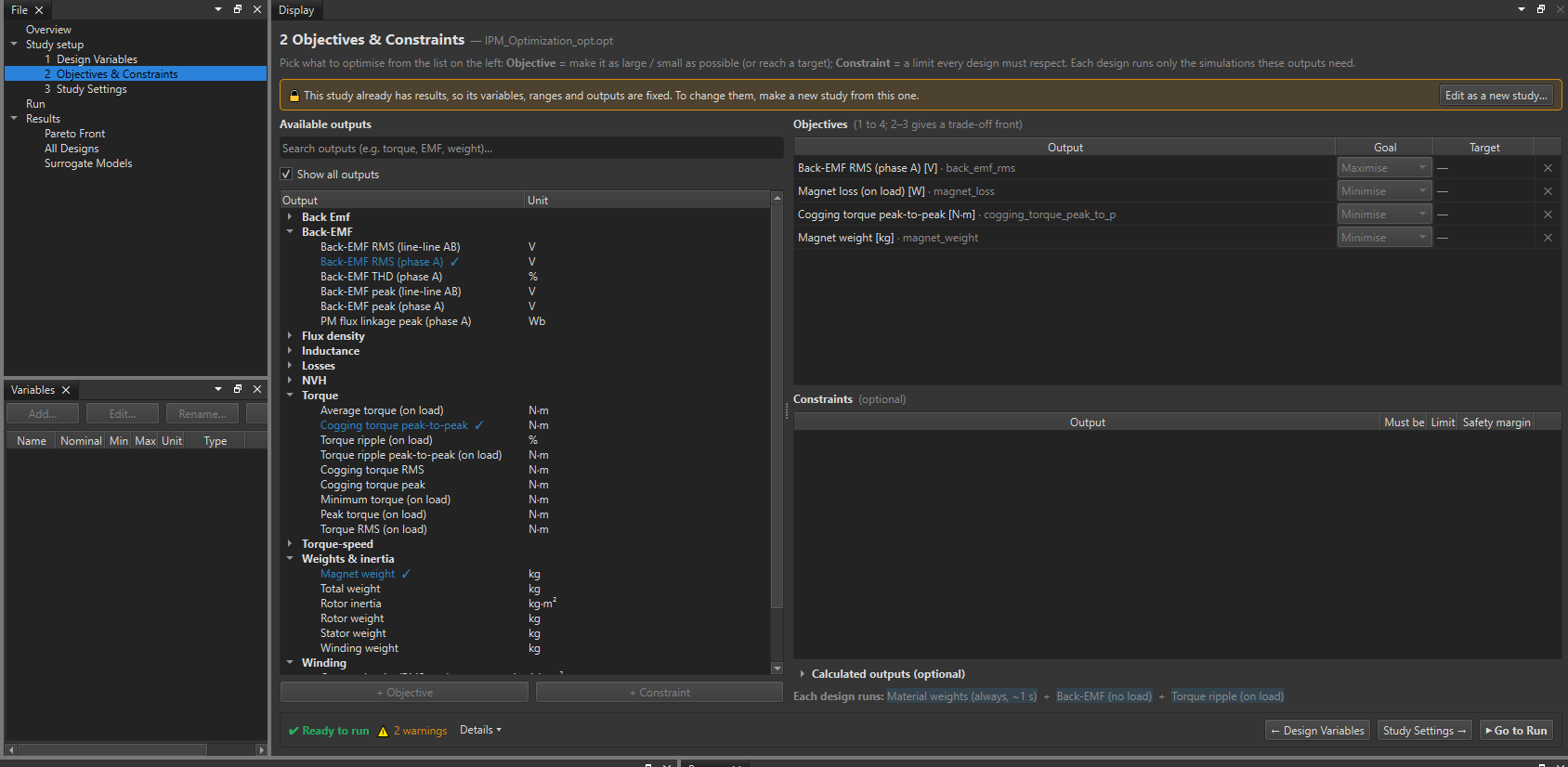
The available objectives depend on the output variables supported by the selected motor model. You can also define constraints to restrict the search to acceptable designs — these help prevent the optimizer from choosing a design that scores well against the objective but fails an important engineering requirement. In the example below, I maximize back EMF while minimizing cogging torque, magnet weight and back-EMF THD; you can add similar objectives for torque ripple or efficiency.
3. Optimization settings
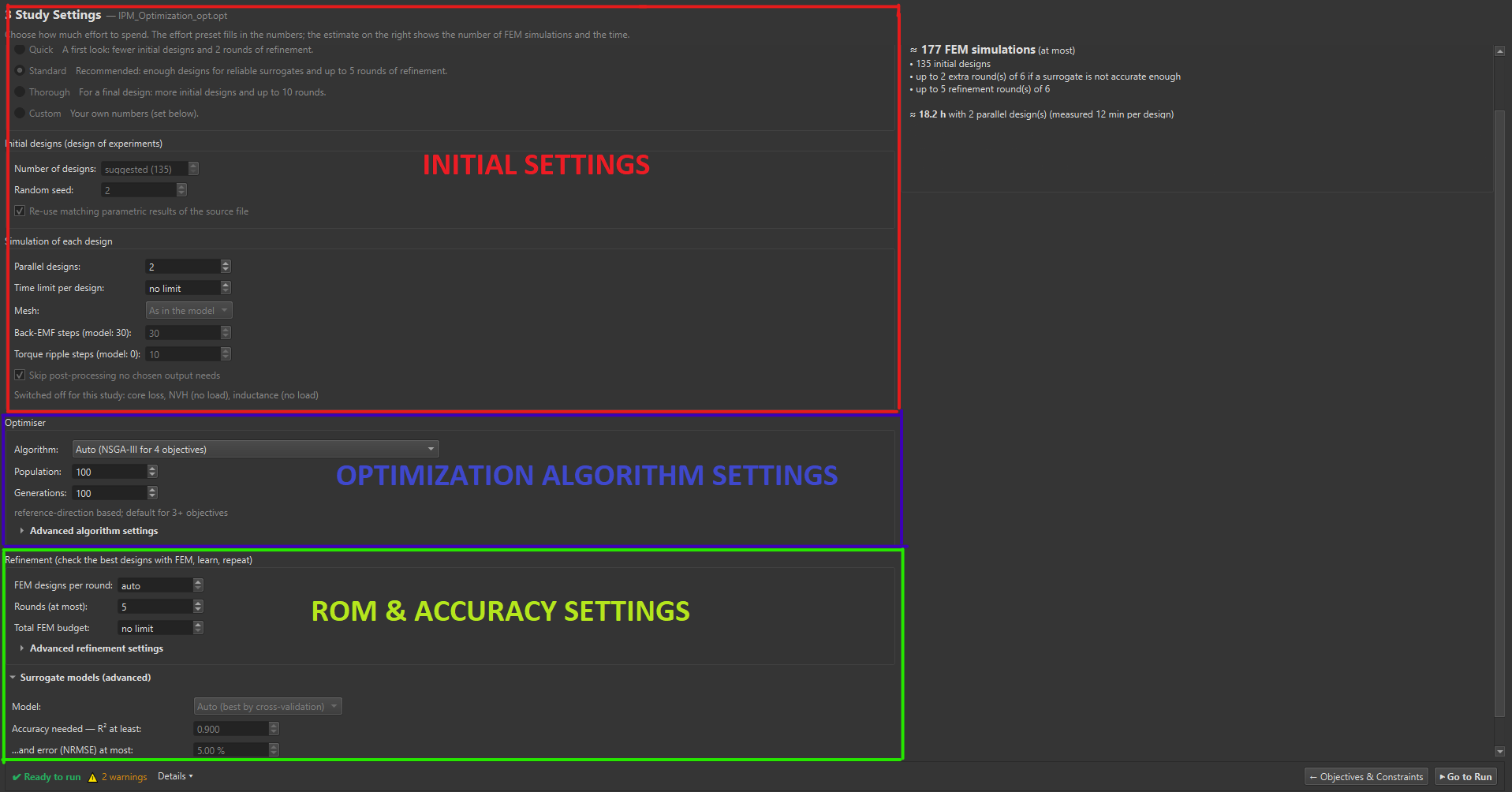
3.1 Initial settings
You can set how thorough the reduced-order modeling should be, with four options:
- Quick: only a few initial designs are sampled to build the ROM, and just 1 round of FEA builds it with the accuracy checked once — 2 rounds of FEA in total.
- Standard: more designs are used to create the ROM, with up to 5 rounds of FEA checks.
- Thorough: similar initial designs to Standard, but the ROM is checked for up to 10 rounds against FEA — making it far more accurate.
- Custom: you choose the number of samples and the number of rounds the ROM is validated against FEA.
You can also select the number of threads dedicated to the simulation, the mesh type and simulation settings — think of this as the speed knob of your run.
3.2 Select the optimization algorithm
After the initial settings, you select the optimization algorithm. For multi-objective problems, algorithms such as NSGA-II, NSGA-III and MOPSO help explore the trade-offs. MotorDesignSoftware also includes other methods, with algorithm recommendations available based on the selected objectives and constraints. The aim is to explore the design space efficiently and identify promising candidates that meet the requirements.
3.3 Reduced-order model & accuracy
Running FEA for every candidate design can be expensive, especially with many parameters. To reduce the cost, MotorDesignSoftware builds a reduced-order model (ROM) using results from a selected set of FEA simulations. The ROM approximates the relationship between the design parameters and performance; once trained, it can predict the relevant outputs for additional designs far faster than a full FEA run. The ROM options are:
- Gaussian: can approximate nonlinear relationships between design parameters and outputs.
- Quadratic response surface: a polynomial approximation useful for relatively smooth relationships.
- Extra Trees: a tree-based ensemble that can capture more complex relationships.
- Auto: automatically selects a suitable model based on cross-validation.
The best choice depends on the problem — some designs have smooth performance trends, others exhibit stronger nonlinearities or parameter interactions. The automatic option is a convenient starting point. Since a ROM is an approximation, it's important to check how well it represents the FEA results; MotorDesignSoftware lets you specify accuracy requirements for the surrogate model via two criteria:
- Minimum R²: how well the model captures variation in the data — a higher value generally indicates a better fit.
- Maximum NRMSE: the normalized root-mean-square error, measuring prediction error relative to a normalization scale — a lower value generally means more accurate predictions.
4. Run the optimization
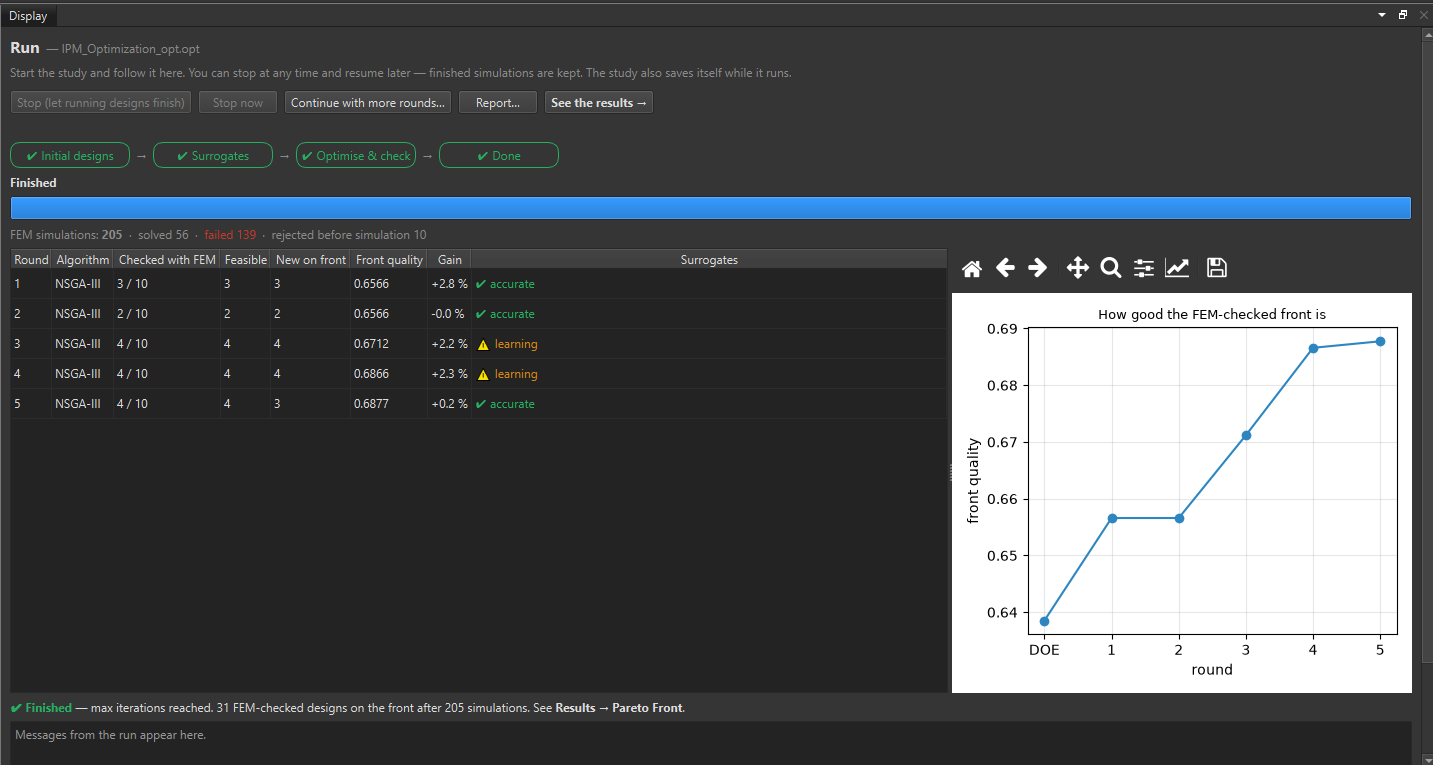
Once the study is configured, go to the run section and click run to start. At any time, Stop (let the running design finish) stops after the current step completes and can be continued later (think of it as a save point), while Stop now stops the simulation immediately. As the rounds complete, you'll see the ROM's accuracy improving on the right. If you're not happy with the accuracy at the end, click Continue with more rounds...
5. Results
Results can be visualized from the various Pareto-front graphs and other plots. When you select a particular design, you can view the geometry with View Geometry, open it as a new file with Open as .mds..., or apply it to the existing base model with Apply to the source model...
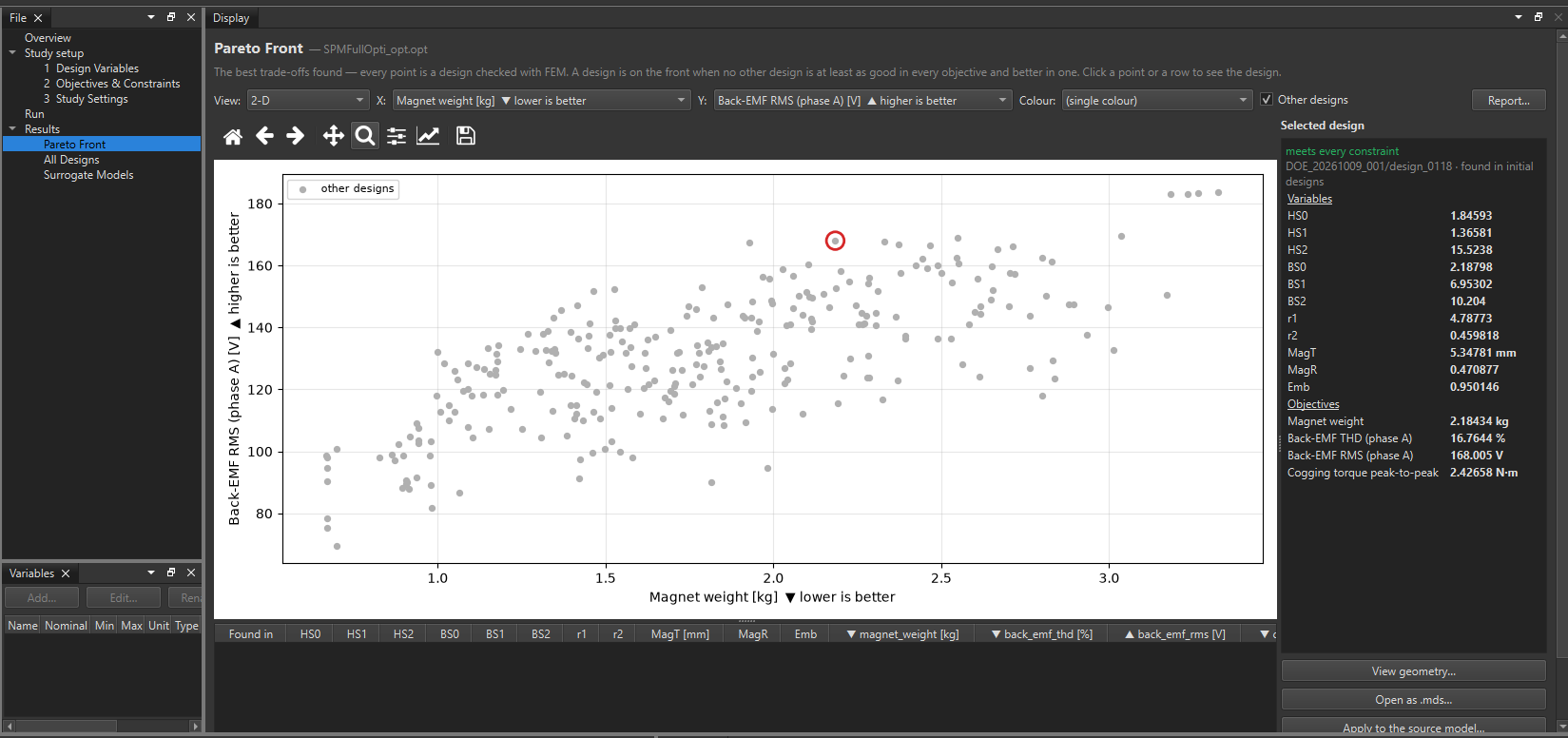
Clicking Surrogate Models shows how accurate the surrogate models are compared with the actual results for each defined objective.
Improvements
The optimizer is still in development and not yet available. If you have a particular use case or need a custom workflow that suits your needs, please email us at [email protected] and we can discuss it further.
← Back to all articles